

Credits
Credits pay for GPU instances, including model services you run on them. Token Factory is free and doesn’t use them.
Credits aren’t the same as AMD AI Developer Program points. On the China site you exchange points for credits. See AMD AI Developer Program.
How credits are spent
Section titled “How credits are spent”- A running instance spends 1 credit per GPU every hour. The rate is shown on the size you pick, for example 1 GPU · 16 cores · 55GB · 1 credit / hour.
- The first hour is charged within a minute or two of the instance becoming ready, and each later hour as it begins.
- Your balance has to cover the first hour. On the Global site, a launch is refused otherwise. On the China site, the launch goes ahead, but the instance is deleted as soon as that first hour can’t be charged.
- When your credits run out, the instance is deleted. Save your work to a persistent
/workspacebefore that happens. See Keep your data. - A destroyed instance spends nothing. Destroy it when you’re done; an idle instance still spends credits.
Check your balance
Section titled “Check your balance”Click your account in the top-right corner of the console. The menu shows your balance, for example 8,167 credits.
For details, choose Credits & Usage. The page shows your balance and your Token Factory usage.
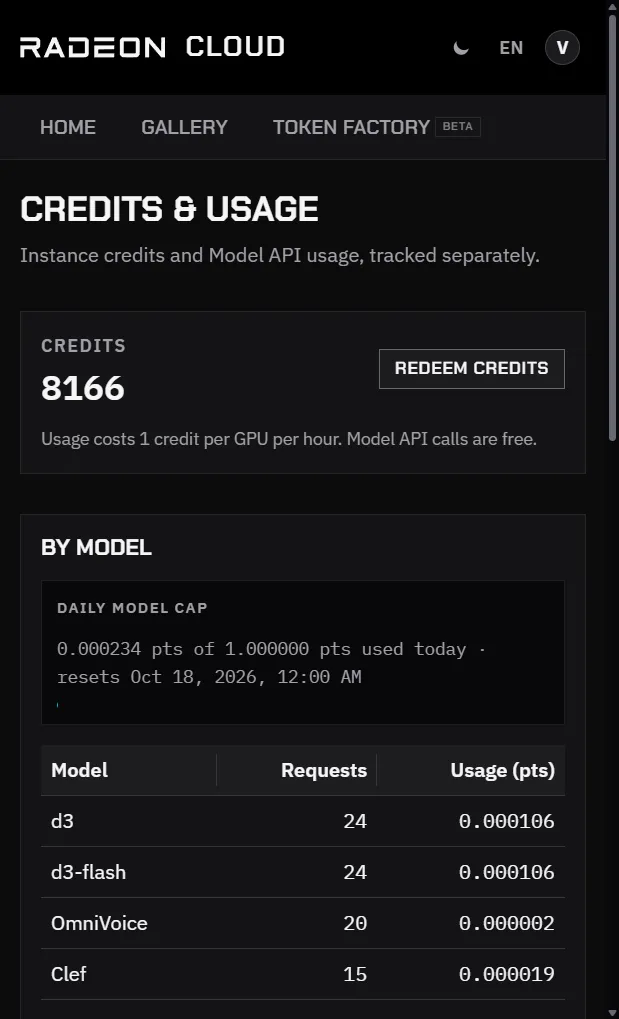
The balance is also returned by GET /api/me. See Account.
Get credits
Section titled “Get credits”- China site: exchange AMD AI Developer Program points for a coupon. 1 point buys 1 hour, up to 20 points a day. See AMD AI Developer Program.
- Events: hackathons and workshops may hand out coupons directly.
Redeem a coupon
Section titled “Redeem a coupon”- Open Credits & Usage from the account menu.
- Click Redeem credits.
- In Redeem a code, paste the whole coupon and click Redeem.
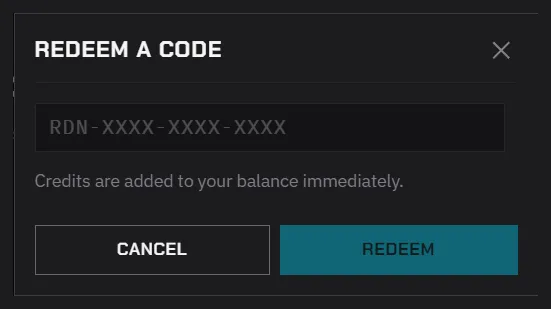
The example in the field is RDN-XXXX-XXXX-XXXX, but a coupon from the developer program is a long string of letters, digits and symbols. Paste all of it.
When it works, the console shows how many credits were added, and the balance updates right away. That code is not valid. Check it and try again. means the coupon is incomplete, expired, already used, or meant for another site. See If redemption fails.
Credits belong to the site where you redeem them and can’t be moved between the China and Global sites.
Token Factory usage
Section titled “Token Factory usage”Token Factory doesn’t spend credits. It has its own daily usage cap, counted in points (pts), which resets at 00:00 Beijing time (UTC+8).
Credits & Usage shows:
- Daily model cap: how much of today’s cap you have used, and when it resets.
- By model: requests and usage per model.
- Recent requests: the last 24 hours, in your local time zone.
To read the same numbers with your API key, call GET /v1/usage.