

Launch from the Gallery
The Gallery collects notebooks that are ready to run on Radeon Cloud, such as tutorials, workshop material and demos. Launching one starts an instance with the environment the notebook needs.
Find a notebook
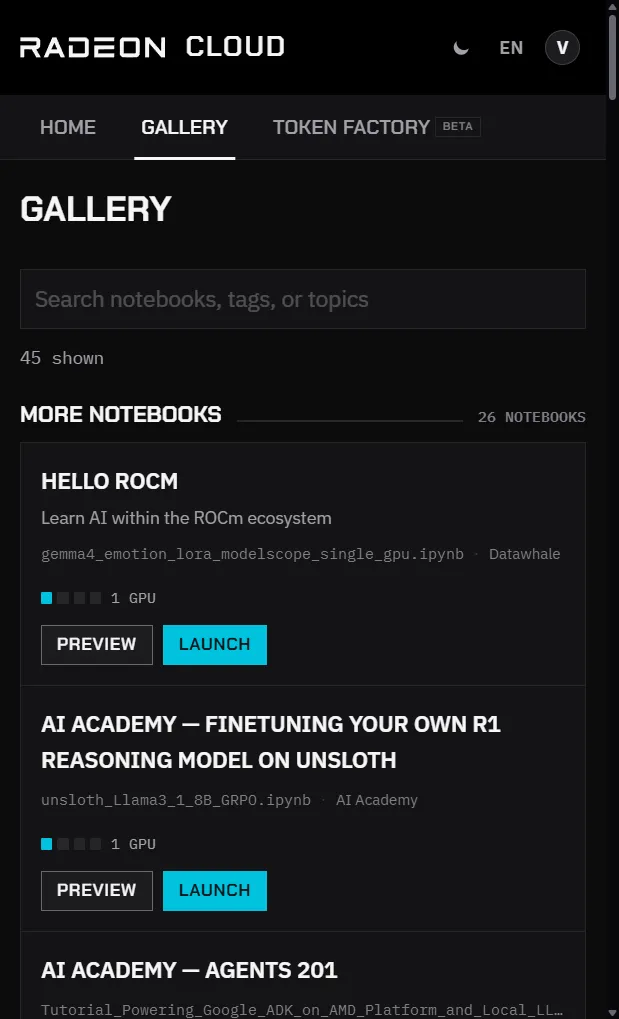
Section titled “Find a notebook”Open Gallery in the console. Notebooks are grouped by category, such as workshops, courses and LLM demos. Each card shows the notebook’s title and description, the notebook file it opens, its tags and the number of GPUs it uses.
Search by title, tag or topic; the count next to the search box shows how many notebooks match. Click Preview to read a notebook before you launch it.
Launch it
Section titled “Launch it”- Make sure no instance is running. The Launch buttons are disabled while one is.
- Click Launch on the notebook.
- Follow the launch dialog as for any instance. See Launch an instance.
- When the instance is ready, click Open notebook.
The instance uses the image and size set by the notebook’s author, or one GPU if the notebook doesn’t specify a size. SSH is on, as for every instance. It spends credits like any other instance, so destroy it when you’re done.