

Destroy an instance
A running instance spends credits whether you use it or not. Destroy it when you’re done.
Destroy from Home
Section titled “Destroy from Home”- Open Home. The instance card shows your running instance.
- Click Destroy instance.
- The confirmation names the instance, its GPUs and how long it has been up, and reminds you that temporary workspace data is deleted and persistent workspace data is kept. Check that it’s the right instance and click Destroy.
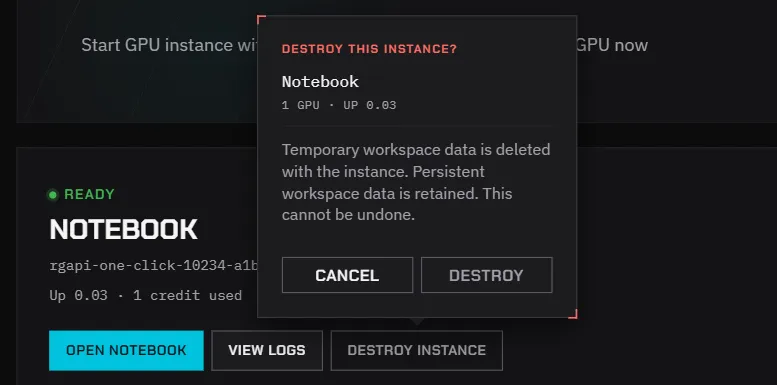
The card shows Destroying instance. When it’s gone, the launch form comes back and credits stop.
If you need anything that isn’t under a persistent /workspace, save it first. See Keep your data.
Destroying usually takes a few seconds.
Destroy from JupyterLab
Section titled “Destroy from JupyterLab”JupyterLab has a Delete instance button in its top-right corner. Click it, then click Destroy in the confirmation. The confirmation carries the same reminder about temporary and persistent data.
The JupyterLab tab stays open afterwards but no longer works. Close it; Home shows that no instance is running.
If destroying takes too long
Section titled “If destroying takes too long”If the card shows Destroy is taking longer than expected, refresh the page. If the instance is still there after a few minutes, email member-service@mail.developer.amd.com.cn with the time and the instance name.
Instances that stop on their own
Section titled “Instances that stop on their own”The platform also deletes an instance when your credits run out, and when the Auto-reclaim time shown on the launch form has passed. Don’t rely on these limits to stop an instance for you: credits spent up to that point are still spent, and a job cut off mid-run loses whatever it hadn’t saved.
Signing out doesn’t stop an instance
Section titled “Signing out doesn’t stop an instance”Signing out of the console, closing the browser or signing out of the CLI leaves the instance running.
From the CLI or API
Section titled “From the CLI or API”- CLI:
rcc instance delete --yes. See Manage GPU instances. - API: see Instances.